Deeplinking
Setup
Android Setup
You can follow the instructions on the Android Deeplinking article to learn more.
You can also read more on React Native's Deeplinking documentation page.
iOS Setup
Open Xcode and open your projects xcworkspace:
File > Open > project/ios/*/*.xcworkspace
In your Info.plist, add the movable_ink_universal_link_domains key as an array containing all the domains that you'd like the MovableInk SDK to handle. Note: These should only be domains that are shown in your Creative Tags, such as mi.example.com:
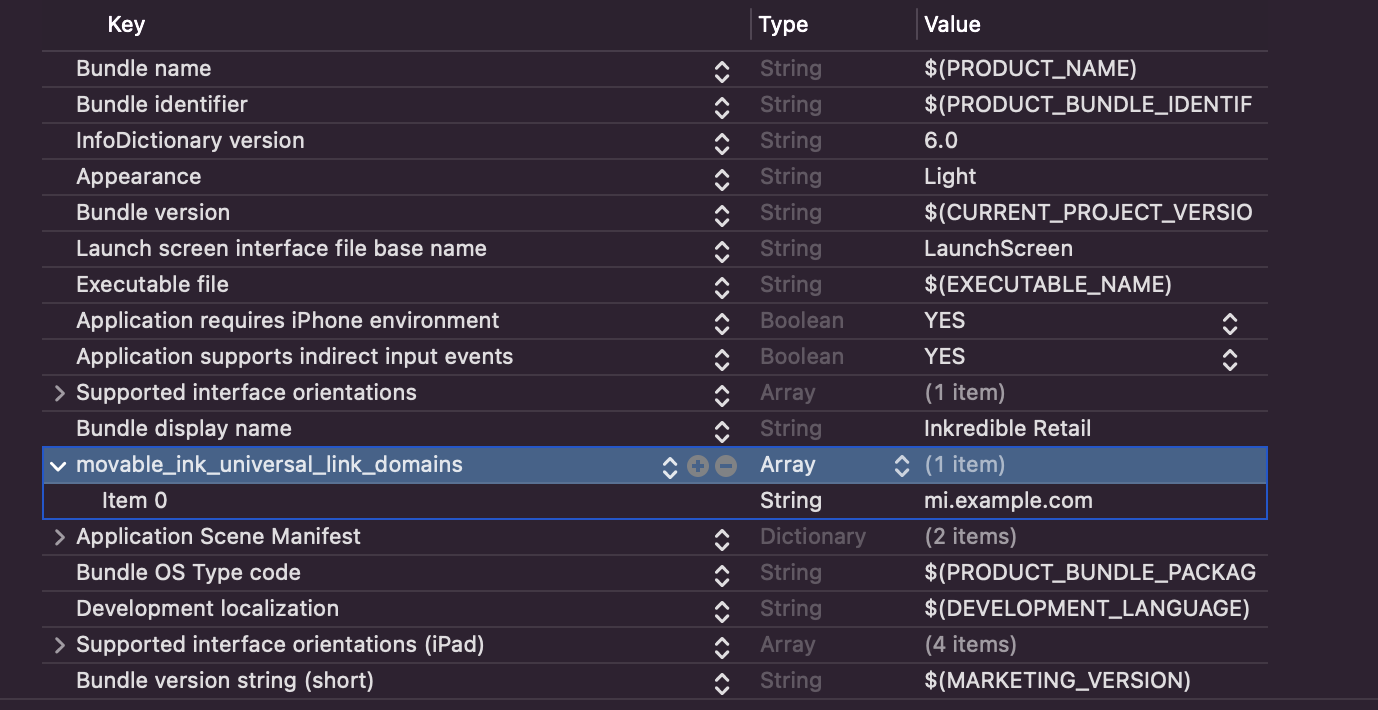
You can also edit the Info.plist in the Project Settings.
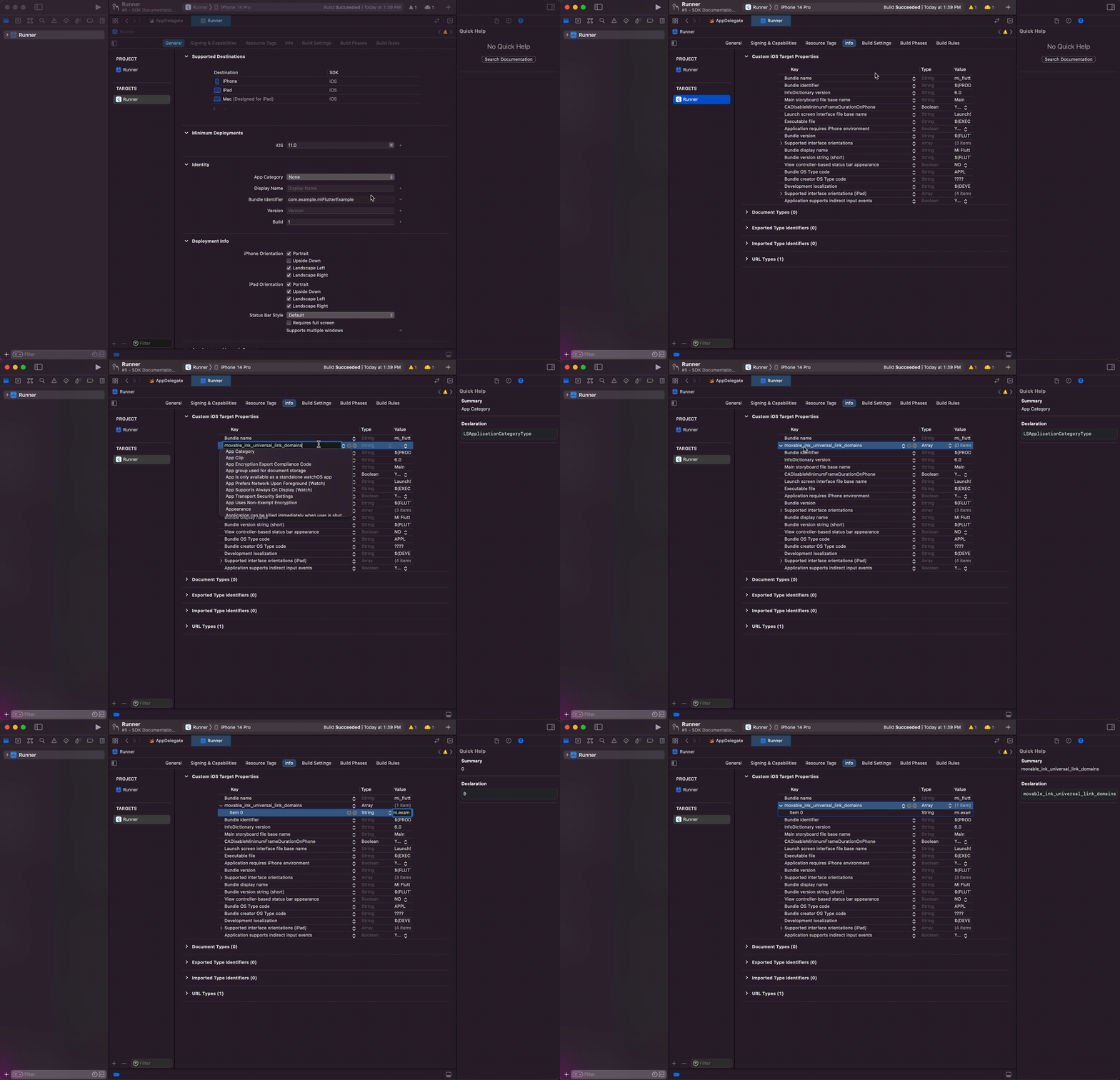
Navigate to the Project Settings, then to the Info tab.
Here, you can add the movable_ink_universal_link_domains key as an array:
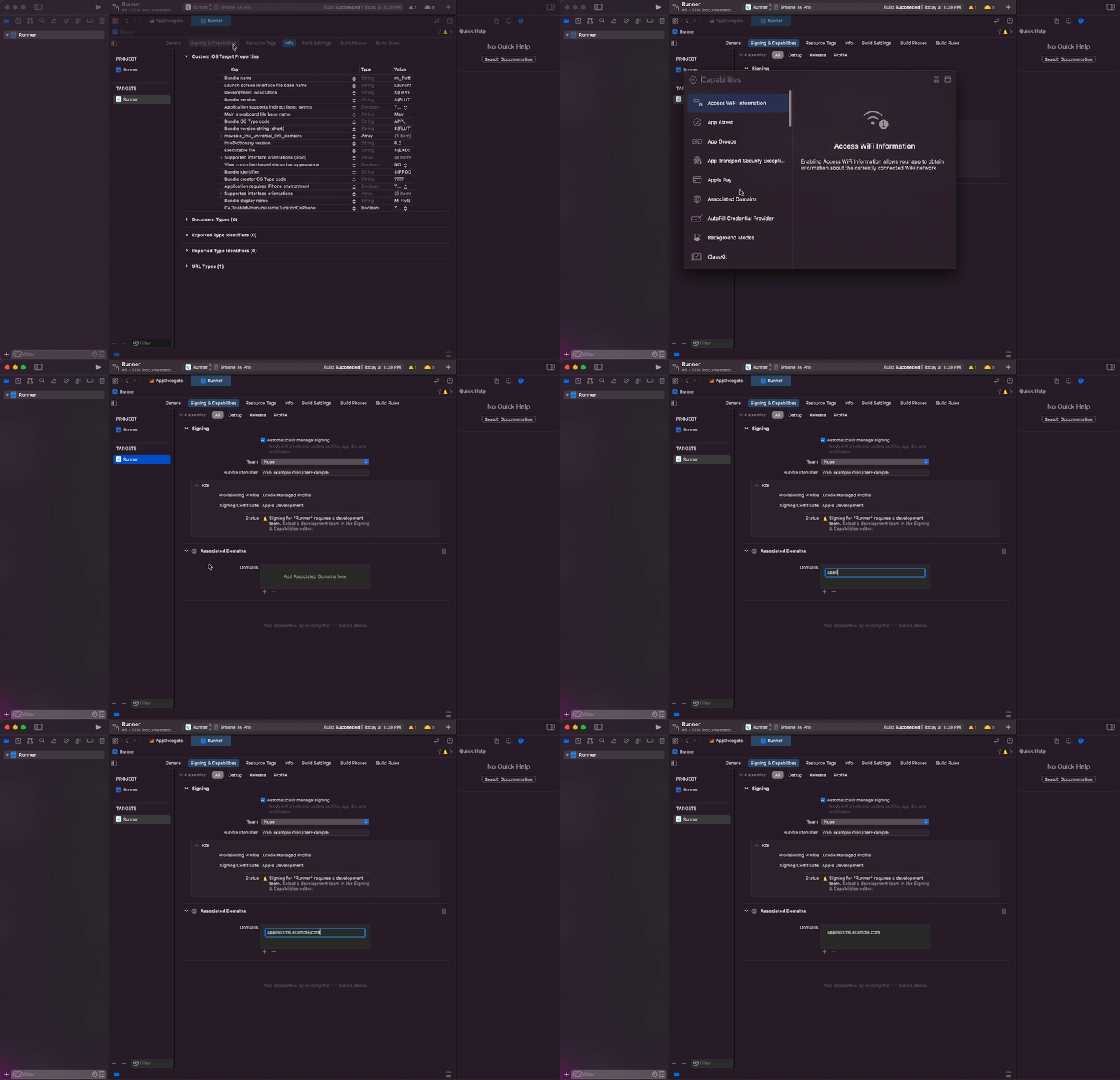
Under the Signing & Capabilities tab, add the Associated Domains Capability, then add the applinks that you can support. These should include the same domains as the ones in the movable_ink_universal_link_domains in the step before.
For example, if your MovableInk Domain is mi.example.com, you'd want to add
applinks:mi.example.com.
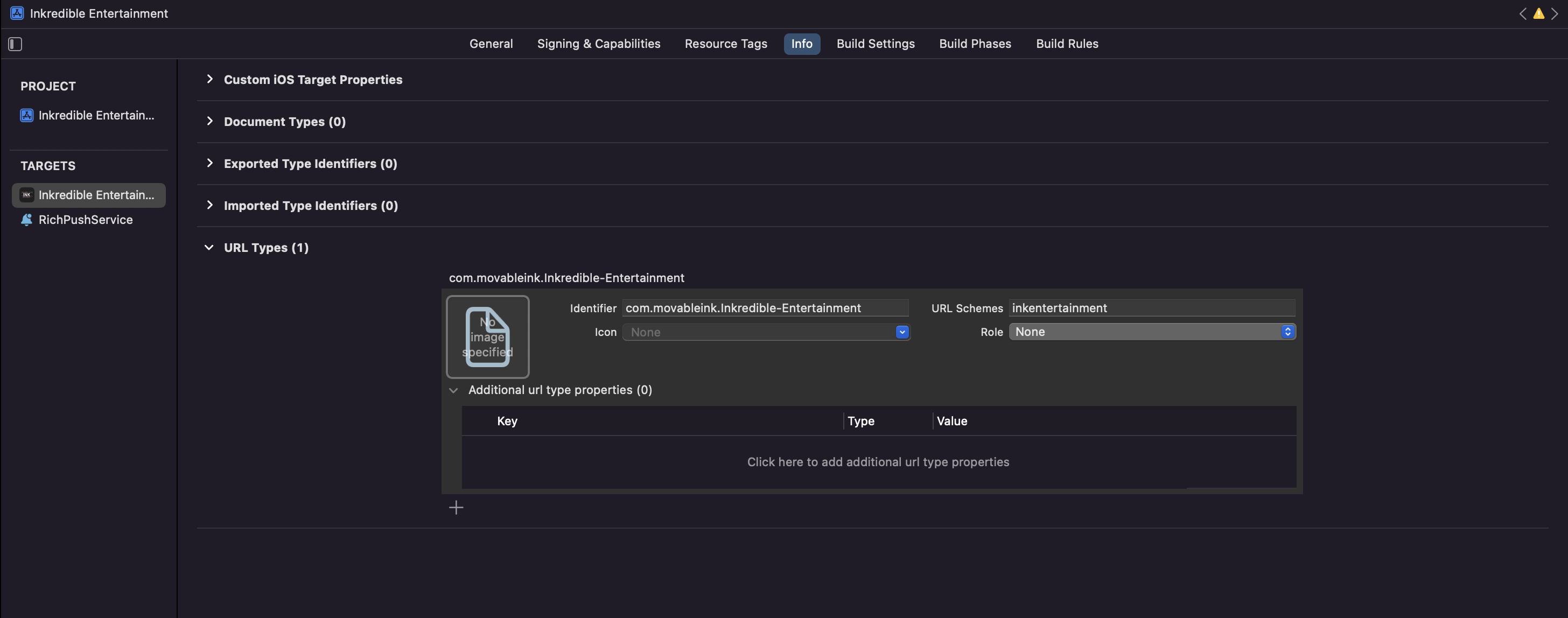
If you want to deeplink to your app via a custom scheme, such as myapp://products/1, you'll need to register this custom scheme in your info plist.
You can read how to enable Deeplinking on iOS from React Native's Deeplinking documentation page; here's the gist:
Open the AppDelegate.mm file, import RCTLinkingManager from React, and implement the openURL and continueUserActivityMethods like below:
#import <React/RCTLinkingManager.h>

@implementation AppDelegate

- (BOOL)application:(UIApplication *)app
    openURL:(NSURL *)url
    options:(NSDictionary<UIApplicationOpenURLOptionsKey,id> *)options  {
  return [RCTLinkingManager application:app openURL:url options:options];
}

- (BOOL)application:(UIApplication *)application
    continueUserActivity:(NSUserActivity *)userActivity
    restorationHandler:(void (^)(NSArray<id<UIUserActivityRestoring>> * _Nullable))restorationHandler {
  return [RCTLinkingManager application:application
                   continueUserActivity:userActivity
                     restorationHandler:restorationHandler];
}


@end
Usage
You will be notified of an incoming deeplink that opens the app using Linking, then asking MovableInk to resolve it if it can.
import * as React from 'react';
import { StyleSheet, View, Text, Linking, Button } from 'react-native';
import RNMovableInk from '@movable/react-native-sdk';

export default function App() {
  const [link, setLink] = React.useState<string | undefined>();

  React.useEffect(() => {
    // Make sure to call RNMovableInk.start when your app start
    RNMovableInk.start();

    // Get the initial deeplink used to open the app if there was one.
    // This will be set if your app was not already launched.
    const getInitialURL = async () => {
      const universalLink = await Linking.getInitialURL();

      try {
        // If there was a link, ask RNMovableInk to resolve it.
        // If it's not a MovableInk Link, resolveURL will return null.
        // If MovableInk can handle the link, and resolution fails, it will reject.
        if (universalLink) {
          await resolveURL(universalLink);
        }
      } catch (error) {
        console.log(error);
      }
    };

    // Call the function!
    getInitialURL();

    // Setup a listener to receive updates while your app is launched
    const urlListener = Linking.addEventListener(
      'url',
      (event: { url: string }) => {
        (async () => {
          await resolveURL(event.url);
        })();
      }
    );

    return () => {
      urlListener.remove();
    };
  }, []);

  // A function to ask RNMovableInk to resolve an incoming deeplink
  const resolveURL = async (url: string) => {
    const clickthroughLink = await RNMovableInk.resolveURL(url);

    if (clickthroughLink) {
      setLink(clickthroughLink);
    }
  };

  return (...);
}

React.useEffect(() => {
  // Whenever the link changes, navigate to the correct page
  ...
}, [link]);
In the above example, link will be set to the resolved clickthrough link if it could be resolved.
You can use this to navigate to the correct page when it changes.
Deferred Deeplinking
When a user attempts to open a MovableInk Link that is designated as a deferred deeplink on an iOS device, and they don't already have your app installed, MovableInk will enable Deferred Deeplinking. Instead of being directed to your website experience, they will be shown a page to open the App Store to download your app.
Once downloaded, MovableInk can check the pasteboard for the original link and allow you to open that location inside your app instead.
Before you can use Deferred Deeplinking, you'll need to setup the sdk_install event schema.
You can read more about integrating Deferred Deeplinking here.
After you've setup Deferred Deeplinking, you'll need to enable the app install event before calling start:
// If using Deferred Deep Linking, make sure to enable the app install event
RNMovableInk.setAppInstallEventEnabled(true);

// Make sure to call RNMovableInk.start when your app starts
RNMovableInk.start();

// Call this anytime after you've called start when you're ready to check for a deferred deeplink
RNMovableInk.checkPasteboardOnInstall();
Warning
If this is ran on iOS 16+, this will prompt the user for permission to read from the pasteboard.